
Last Updated on March 10, 2026 by Partho Protim
Writing a blog takes a lot of time. You need to write the article, add images, add links, write meta descriptions, fully optimize for SEO…and a lot. If you do all of this by hand, it can take 6 to 8 hours per article.
That is too slow if you want to grow.
The good news is that most of these steps can be automated. You can use tools to write articles, publish them, optimize them for SEO, and share them , without doing everything yourself.
This guide shows you exactly how to automate your WordPress blog. We cover the main areas where automation saves the most time. We also show how AI tools like Nany Article Writer can handle the hardest part , writing the article itself.
What Can You Automate on a WordPress Blog?
Before we go into details, here is a quick list of what you can automate:
- Content writing : AI tools generate full articles from a keyword
- Publishing : Schedule posts or auto-publish via API
- SEO : Auto-generate meta titles, descriptions, and schema
- Images : Auto-create featured images and compress them
- Internal linking : Auto-suggest links to other posts on your site
- Social media sharing : Auto-post to Facebook, LinkedIn, and more
- Email newsletters : Send new posts to subscribers automatically
Now let us go through each one.
1. Automate Content Writing With AI
This is the biggest time saver. Writing takes the most time. If you can automate or speed up writing, everything else becomes easier.
The Old Way
You pick a keyword. You research it. You write a draft , maybe 1,500 to 3,000 words. You edit it. You format it. Then you move on to the next step.
That is 4 to 6 hours just for writing, even for an expert, if you want to write in depth.
The AI Way
AI writing tools let you enter a keyword and get a full, structured article in minutes. A good tool generates long form content (2,000+ words), organizes the content with headings, and follows SEO best practices.
Nany Article Writer does this. You enter a keyword , for example, “how to start a vegetable garden” , and it generates a complete SEO article. The article includes an introduction, multiple sections with H2 headings, and a conclusion. It is ready in minutes, not hours.
This replaces the most time-heavy part of blogging.
What to Do After AI Writes the Article
AI gives you a strong draft. Before you publish, do a quick review:
- Read the article once
- Add any personal examples or data
- Check that the facts are correct
- Adjust the tone if needed
This review takes 15 to 30 minutes. Compare that to writing 3 to 5 hours from scratch.
Cost comparison: A freelance writer charges $50 to $200 per article, depending on the requirements. An AI writing tool may cost a small monthly fee and can generate many articles. For most bloggers and businesses, this saves 80% or more on content costs.

2. Automate Publishing to WordPress
Once your article is ready, you need to publish it. You can do this manually , copy the content, paste it in WordPress, set the category, add tags, and click publish.
Or you can automate it.
Option 1: Direct WordPress Integration
Some AI writing tools connect directly to your WordPress site. Nany Article Writer supports this. When your article is ready, it can send the content straight to your WordPress dashboard. No copy-pasting needed.
This uses the WordPress REST API. The tool sends the title, body, meta data, and featured image to your site. The post appears as a draft or goes live immediately , you choose.
Option 2: WordPress Post Scheduling
WordPress has a built-in scheduler. When you create a post, you can set a future date and time. WordPress publishes it automatically at that time.
This is useful if you write multiple articles at once and want to spread them out. Write 5 articles on Monday. Schedule one for each day of the week. Your blog stays active without daily work.
Option 3: WP-CLI for Advanced Users
WP-CLI is a command-line tool for WordPress. Developers use it to run WordPress tasks from a server or script. You can create and publish posts with a single command. This is useful for bulk publishing or running WordPress tasks automatically on a schedule.
3. Automate SEO – Meta Titles, Descriptions, and Schema
Good SEO takes time. For each article, you need to write a meta title, a meta description, and sometimes add schema markup. This is extra work after the article is already written.
Auto-Generate Meta Titles and Descriptions
Nany Article Writer generates SEO meta titles and descriptions automatically. When the article is ready, the meta data is ready too. The title is written to be clear and include the main keyword. The description is written to encourage people to click.
You can use these as-is or make small edits. Either way, you save time.
You can also use plugins like Yoast SEO or Rank Math to help. These plugins show you how well your meta data is optimized and let you edit it easily.
Add Schema Markup Automatically
Schema markup is code that helps Google understand your content better. It can make your result look different in search , for example, showing star ratings or FAQ answers directly in Google.
Rank Math and Yoast add schema automatically based on your post type. For recipe blogs, it adds recipe schema. For how-to guides, it adds HowTo schema. You do not need to write any code.
Auto-Generate Internal Links
Internal links connect your articles to each other. They help readers find more content. They also help Google understand your site structure.
The plugin Link Whisper scans your article and suggests links to other posts on your site. You approve the suggestions with one click. This saves time and improves SEO without manual work.
Nany Article Writer also includes internal linking suggestions as part of its output, so you can see which related posts to link before you even publish. This works once you connect your wordpress blog to this tool.

4. Automate Featured Image Creation
Every article needs a featured image. Finding or creating images is another time-consuming task.
AI Image Generation
Instead of searching for stock photos or opening design tools, you can generate images with AI. Tools like DALL-E, Midjourney, or Stable Diffusion create images from a text description.
For example: “A clean, modern photo of a laptop on a desk with a coffee cup, for a blog about productivity.” The AI creates an image in seconds.
Nany Article Writer includes featured image generation as part of the article creation process. When your article is ready, a featured image is generated to match the topic. This means one less tool to open and one less task to do.
Auto-Compress Images
Large images slow down your website. Slow websites rank lower on Google.
Plugins like Imagify or ShortPixel compress images automatically when you upload them. You do not need to resize or compress anything manually. The plugin does it in the background.
5. Automate Social Media Sharing
After you publish an article, you need to share it. This means going to Facebook, LinkedIn, Twitter/X, and other platforms and posting about it.
This takes time. And it is easy to forget.
Auto-Share When You Publish
You can connect WordPress to social media tools so that every new post is shared automatically.
Zapier, Make (formerly Integromat), and n8n are popular tools for this. They watch for new posts on your WordPress site and send a message to your social media accounts.
Here is a simple workflow:
- New post published on WordPress
- Zapier detects the new post
- Zapier creates a social media message with the title and link
- Message is posted to Facebook, LinkedIn, or Twitter/X automatically
You set this up once. After that, every new post is shared without any extra work.
Tool Comparison: Zapier vs Make vs n8n
| Feature | Zapier | Make | n8n |
|---|---|---|---|
| Ease of use | Very easy | Medium | Harder |
| Free plan | Yes (limited) | Yes (limited) | Yes (self-hosted) |
| WordPress support | Yes | Yes | Yes |
| Cost (paid) | From $20/month | From $9/month | Free if self-hosted |
| Best for | Beginners | Intermediate | Developers |
For most bloggers, Zapier is the easiest to start with. For those who want more control at lower cost, n8n is a good option.
Revive Old Posts
New visitors do not see your older articles unless you link to them. The plugin Revive Old Posts automatically shares your old articles on social media on a schedule. This brings more visitors to content you already wrote.
6. Automate Email Newsletters
When you publish a new article, you want your email subscribers to know. Sending an email manually each time takes effort.
Auto-Send Email When You Publish
Tools like Mailchimp, ConvertKit, and MailerLite have automation features. You can set a rule: when a new post is published, send a newsletter to your list.
Connect your email tool to WordPress using Zapier or a direct plugin. When a post is published, the automation starts. It pulls the title, a short summary, and the link, then sends the email.
This keeps your audience informed without manual work.
A Complete Automated WordPress Workflow
Let us put all of this together. Here is what a fully automated WordPress blog workflow looks like:
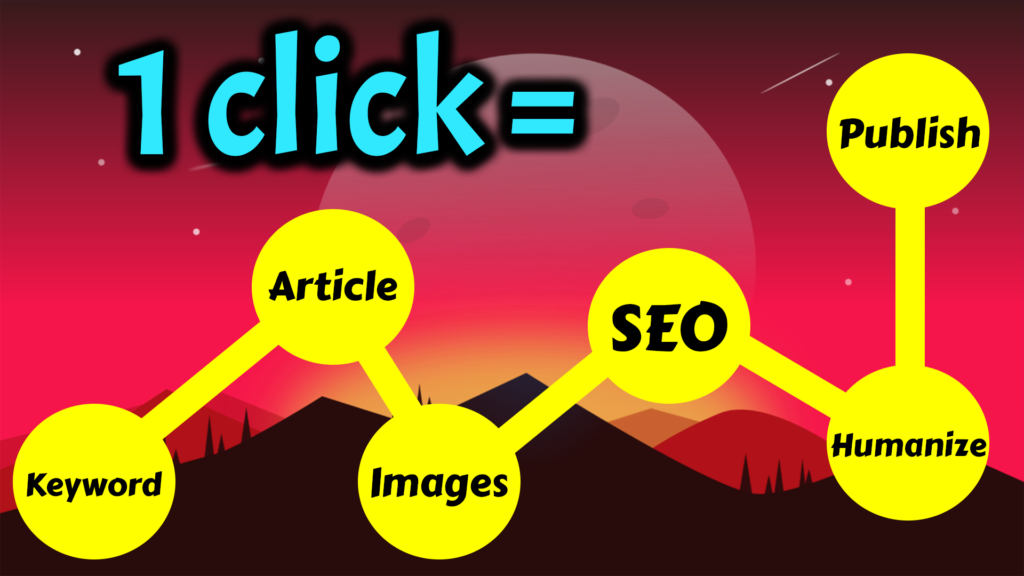
Step 1 : Enter a keyword
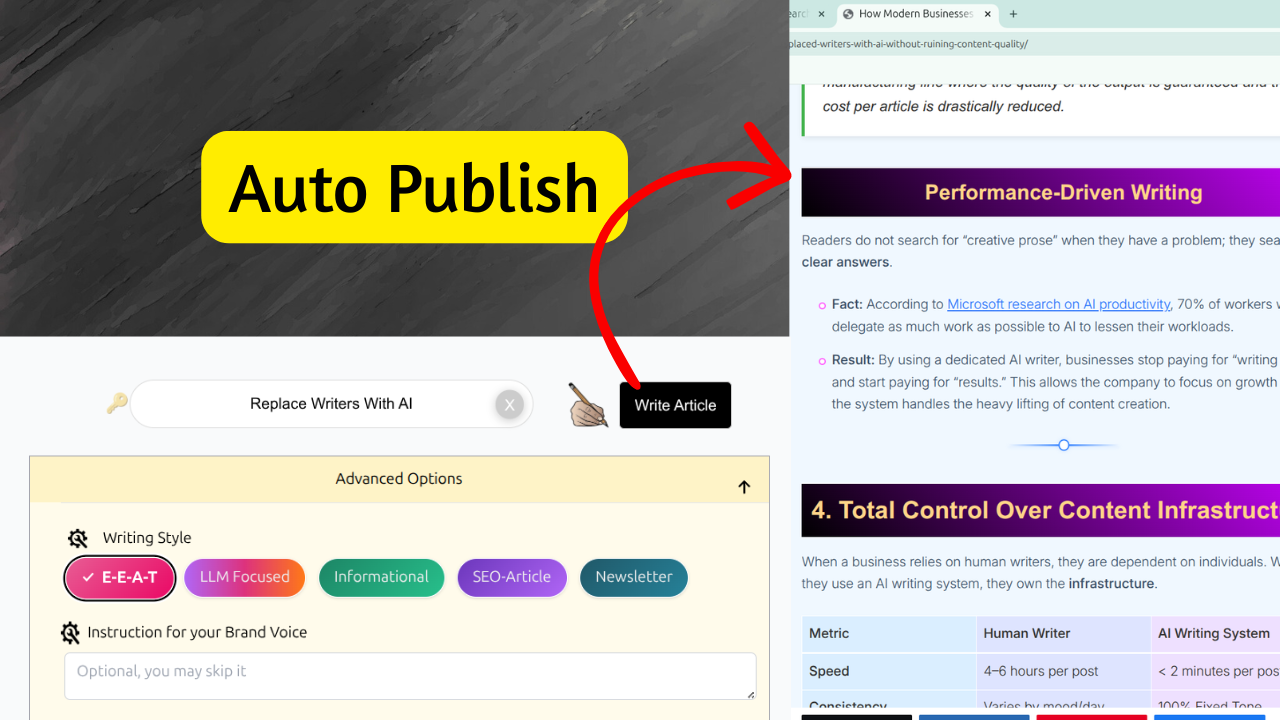
You open Nany Article Writer and enter your target keyword.
Step 2 : AI generates the full article
In minutes, you get a complete article ready to publish. Here is what Nany Article Writer delivers:
- 2,000+ words written to rank , not just fill space
- RankMath score of 90+ and Yoast 12-14 green criteria met
- Feels like a human wrote it , personal tone, no AI fluff, follows Google’s E-E-A-T guidelines
- SEO meta title, key phrase, URL slug, and meta description , all written by AI
- AEO optimized , structured for Google featured snippets and AI answer boxes
- 4–8 related and HD quality images inserted automatically
- Image SEO done , alt text, title, caption, and description use your primary keyword
- High DA outbound links added to boost your page authority
- FAQs generated automatically inside the article
- Block quotes added for better readability and user-first content
- Flesch readability and Hemingway scores kept at industry standard
- Passes major plagiarism detection tools
You get a publish-ready article. Not a rough draft.
Step 3 : Quick review
You spend 15 to 30 minutes reading and making any small edits. Or you may set auto-publish, that case no-editing needed.
Step 4 : Auto-publish to WordPress
You click publish directly from Nany Article Writer. The article goes to your WordPress site, complete with the featured image and meta data.
Step 5 : Social media auto-share
Zapier or n8n detects the new post and shares it to your social media accounts.
Step 6 : Email newsletter sent
Your email tool sees the new post and sends a newsletter to your subscribers.
The whole process , from keyword to published and shared , takes under an hour instead of a full day.
Tools Summary
Here is a quick list of tools mentioned in this guide:
Content Writing
- Nany Article Writer : AI article generation, meta data, images, WP integration
SEO Plugins
- Yoast SEO : Meta optimization, schema markup
- Rank Math : Meta optimization, schema markup
- Link Whisper : Internal linking automation
Image Optimization
- Imagify : Auto-compress images on upload
- ShortPixel : Auto-compress images on upload
Workflow Automation
- Zapier : Connect apps and automate tasks
- Make : Visual workflow builder
- n8n : Open-source automation (developer-friendly)
Email Marketing
- Mailchimp : Email automation with WordPress
- ConvertKit : Email automation for bloggers
- MailerLite : Affordable email automation
Social Media
- Revive Old Posts : Auto-share old articles on social media
Frequently Asked Questions
What is WordPress blog automation?
WordPress blog automation means using tools and plugins to handle tasks automatically , like writing articles, publishing posts, adding images, sharing on social media, and sending emails. Instead of doing these steps by hand, software does them for you.
Can AI write a full blog article?
Yes. AI writing tools like Nany Article Writer can generate a complete 2,000+ word article from a single keyword. The article includes headings, an introduction, body sections, and a conclusion. Most people review and edit the draft before publishing.
How do I auto-publish posts to WordPress?
You can use the built-in WordPress scheduler to publish posts at a future date and time. You can also use an AI writing tool that connects to WordPress via the REST API and publishes directly. WP-CLI is another option for developers who want to publish from the command line.
Is it safe to auto-publish AI content?
It is safe, but it is good practice to review the article before it goes live. AI can make factual errors. A short review lets you catch mistakes and add a personal touch.
How much time does WordPress automation save?
It depends on your current process. Most bloggers spend 4 to 8 hours per article. With AI writing and automation, this drops to under 1 hour. That is a saving of 3 to 7 hours per article.
How much does it cost to automate a WordPress blog?
A basic setup costs far less than hiring a writer. AI writing tools have monthly plans. Zapier has a free plan for simple workflows. Many WordPress plugins are free. Total cost for a basic automated setup can be under $30 per month.
Do I need coding skills to automate WordPress?
No. Most tools have simple dashboards. Zapier and Make use visual editors , no code needed. AI writing tools work like a simple form. You only need coding skills for advanced setups like WP-CLI or custom REST API integrations.
What is the WordPress REST API?
The WordPress REST API is a way for external tools to communicate with your WordPress site. Tools like Nany Article Writer use it to send article content directly to your site without you opening WordPress manually.
Can I automate internal linking in WordPress?
Yes. The plugin Link Whisper scans your article and suggests links to other posts on your site. Some AI writing tools also suggest internal links before you publish.
What is the best tool to automate a WordPress blog?
For content creation, Nany Article Writer handles writing, SEO meta data, images, and WordPress publishing in one place. For workflow automation between apps, Zapier is the easiest to start with. For SEO, Rank Math or Yoast SEO are the most popular choices.
Can I automate social media sharing from WordPress?
Yes. Tools like Zapier or Make can detect a new post and automatically share it to Facebook, LinkedIn, Twitter/X, and other platforms. You set the workflow once and it runs every time you publish.
What is WP-CLI?
WP-CLI is a command-line tool for managing WordPress. Developers use it to run WordPress tasks from a terminal or server script. You can create posts, install plugins, and run updates without opening the WordPress dashboard.
Conclusion
You do not need to spend hours on every blog post.
AI tools write the article. Automation tools publish it, share it, and notify your subscribers. The right setup turns a full day of work into less than one hour.
The biggest time saver is the writing step. If you want to see how fast AI can write a full SEO article for your WordPress blog, try Nany Article Writer. Enter a keyword and see the result in minutes.
Start with one automation. Add more as you get comfortable. Over time, your blog runs mostly on its own.

Creator of NanyBot. Currently serving as the Director of R&D at NanyBot.
Partho Protim is a versatile software engineer and visionary strategist in AI-driven content creation. With a proven record of transforming complex algorithms into powerful content tools, he empowers creators and brands to boost rankings and drive conversions. His clear, actionable insights simplify even the most intricate digital challenges. Trust Partho to guide you in using AI to create content that captivates audiences and delivers real results.
He has reverse-engineered top-ranking AI content systems, built proprietary frameworks from scratch, and consistently stays ahead of trends in SEO and generative tech. With a deep understanding of both algorithms and human psychology, Partho creates content strategies that not only rank—but resonate. Brands and founders across industries rely on his guidance to stay competitive in the AI era.